
It’s been a while since I’ve shared what’s running in my home server setup aka the homelab. The gear has shifted a bit, some devices have retired, and fiber finally made its way into my neighborhood. Time for a proper update.
Infrastructure
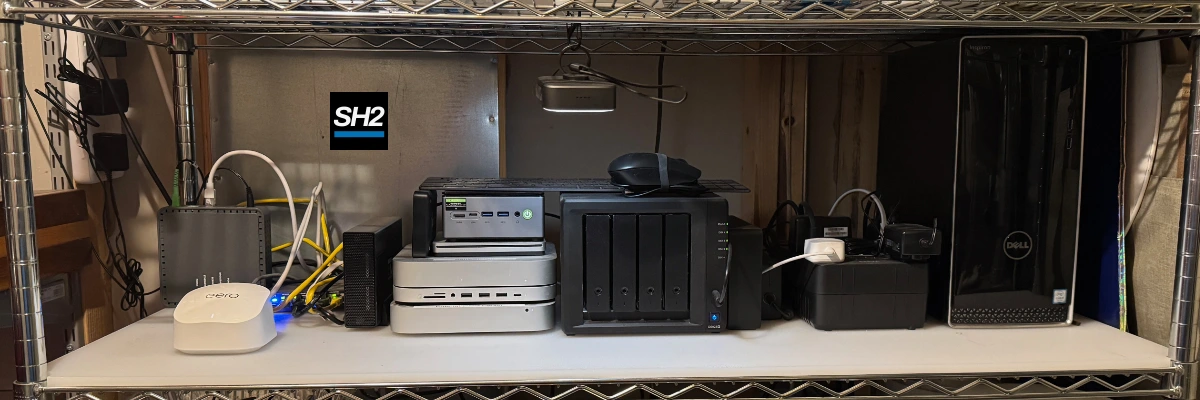
Fiber has finally arrived in my neighborhood, which made it an easy decision to ditch Cox and upgrade to 2Gbps service. Overkill? Absolutely since my wireless setup tops out at 1Gbps in and out of the router. But that just gives me more reason to keep the upgrades coming.
The current lineup:
- Eero 6+ with two extenders for whole-house coverage
- Unmanaged 2.5Gbps ethernet switch
- 2012 Apple Mac Mini
- 2020 M1 Mac Mini
- Dell Inspiron 3668 Desktop (Ubuntu 22.04 LTS Server)
- Synology DS923+ NAS (4x16TB drives in SHR, ~43.6TB usable storage)
- Raspberry Pi 4 running PiHole
The 2012 Mac Mini (The Survivor)
This little machine has been the longest-serving member of my homelab. Since 2012, it’s handled iTunes media sharing and Plex duties. Over the years I’ve maxed the RAM, swapped in an SSD, and kept it alive with OpenCore Legacy Patcher so it can run newer macOS releases.
At this point it’s mostly nostalgia that keeps it running, but it still does its job.
The 2020 M1 Mac Mini (Battlestation)
This one recently moved to the network shelf after I upgraded my primary workstation to an M4 Pro Mac Mini. It’s now running headless and handling the macOS Tahoe beta. Once Tahoe is officially released, it’ll likely take over Plex duties from the 2012 Mini.
It also runs several applications I use in my digital marketing work. Screaming Frog, SEO PowerSuite, a static website archiver, and a broken link crawler all live there. They run fine on my main workstation and laptop, but it’s more convenient to keep them on a separate, shareable device since I often switch between my desktop and laptop and don’t want to worry about keeping things in sync.
The Dell Inspiron 3668 (The Workhorse)
The Dell Inspiron 3668 is the classic story: an “old office PC” reborn as a homelab workhorse. Here’s what it’s running:
- Portainer
- Home Assistant
- Tandoor Recipes
- Uptime Kuma
- N8N
- Dashy
It also self-hosts several of my project websites (including the one you’re reading right now), thanks to Cloudflare Tunnels.
Raspberry Pi 4
Small but mighty, the Pi is dedicated to PiHole — keeping the network a little cleaner and blocking junk at the DNS level. It is also stashed elsewhere, currently in a bookcase in another room.
Synology DS923+
The NAS is where the bulk of my data lives:
- General network drive
- Time Machine backups
- Plex media storage
- Photo backups
- Miscellaneous data hoarding
With 43.6TB usable, I’ve got breathing room for a while.
What’s Next
Once macOS Tahoe goes official, I’ll probably retire the 2012 Mini and migrate Plex over to the M1 Mini. The Dell will keep doing the heavy lifting, but I’m also planning to duplicate a couple of the VPS setups I use for my commercial hosting business on another physical server just to have an on-prem test environment.
I’ve also got some network upgrades in the pipeline to really take advantage of the 2Gbps fiber. A mini PC with dual 2.5Gbps ethernet ports (more about this little GMKtec device later) is waiting to be set up with OPNsense, and once that’s in place, the Eeros will drop into bridge mode. I’ve already run an ethernet drop to my main workstation and may finally tackle wiring a few more throughout the house. The remodeling after the minor house fire we had in May gave me a much better understanding of the wiring structure, so it feels like the right time.
For now, the homelab is stable, but it never stays that way for long…